
A Court Reporter’s Guide to Preparing for Remote Depositions
Remote depositions have gone from a temporary solution during the pandemic to a regular part of legal proceedings. Teams often mix in-person and online formats, though this is no excuse to let the record slip. Strong planning, reliable technology, and collaboration are necessary to keep things running smoothly. With the right approach, court reporting in online legal proceedings can feel as seamless as being in the same room.
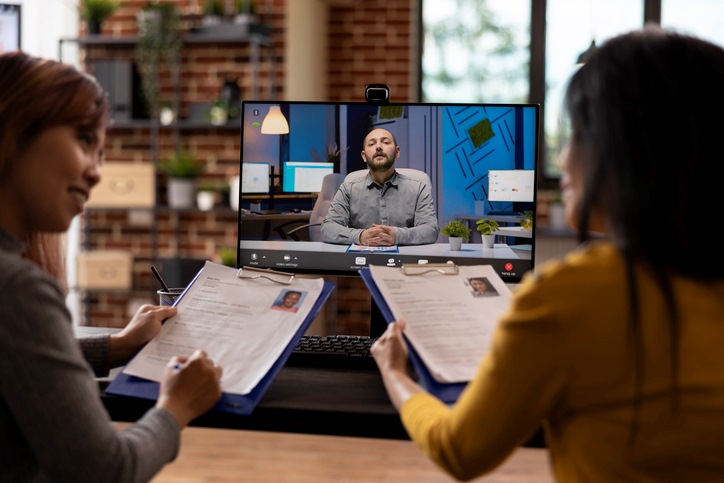
How Virtual Depositions Work?
Online platforms have changed how testimony is captured, but the fundamentals remain the same. Clear video, crisp audio, authenticated exhibits, and a verified witness are still necessary for the record to hold up in court.
A virtual deposition can be entirely online or part of a hybrid setup where some participants appear in person and others connect via Zoom, WebEx, GoToMeeting, or another similar platform. This technology supports real-time feeds, exhibit sharing, breakout rooms, and secure chat. Even with mature web conferencing software at your fingertips, preparation remains essential for both the court reporter and the legal team.
How Court Reporters Prepare for Remote Depositions
Your reporter does far more than show up and press “record.” Here’s how a seasoned professional prepares to capture an accurate and admissible virtual deposition:
- Platform proficiency: Reporters learn the meeting platform you plan to use, including hotkeys, waiting room controls, audio routing, and exhibit tools. They also confirm who hosts and who has recording control.
- Redundant audio capture: Reporters test primary and backup audio paths. They check levels, latency, and echo before going on the record.
- Glossaries and speaker maps: Reporters prepare a list of case-specific terminology and a visual roster of participants to help identify speakers quickly once everyone joins.
- Exhibit workflows: Reporters coordinate exhibit labeling conventions in advance and keep a live index so Exhibit 7 doesn’t get called “Exhibit G” later.
- Security and identity checks: Reporters oversee ID procedures, oath administration, screen-name compliance, and who is allowed in the room, whether virtually or in-person.
- Contingency planning: Reporters set the ground rules on crosstalk, muting, and breaks. They outline what happens if someone’s connection fails, who dials whom, and how the record resumes.
Best Practices for Preparing for Zoom Depositions
Little details have a big impact on how smoothly your deposition goes. Follow these steps to get more out of virtual court reporting and keep the record clean:
- Lock in your setup: Use a wired connection when possible to avoid lag. Test audio and video with the actual headset, webcam, and room you’ll use.
- Plan audio backups: Keep your phone charged so you can dial in for audio if your computer glitches. Headphones with a mic reduce echo and improve clarity for everyone.
- Control the environment: Pick a quiet, well-lit space. Shut the windows and silence your mobile devices. Close unused apps on your computer so processing power stays with Zoom.
- Prepare the witness: Coach your witness on camera placement, muting themselves, and avoiding off-screen prompts. Confirm that no unauthorized parties will be present in the room.
- Prep exhibits early: Send exhibits to the host or reporter ahead of time with the labeling scheme you want. Keep a numbered list of exhibits in the order you plan to use them so you can access each one quickly during questioning.
- Name participants clearly: Use full names and roles in your Zoom screen names. This helps the reporter track speakers and prevents confusion.
- Coordinate breaks: Schedule short breaks every 60 to 90 minutes. Use this time to confirm spellings, exhibit numbers, and any pending read-backs with the reporter.
- Pace the record: Pause after objections and at the end of answers. If anyone talks over each other, check whether the reporter captured everything. Ask the witness to repeat unclear audio rather than pushing forward.
- Close the loop: Before ending the session, confirm signatures, delivery times, and video requests. Stay on the call if the reporter needs to review any final details.
Seek Hybrid Legal Support
Most cases aren’t fully virtual or fully in person. Schedules, locations, and witness needs change constantly. A court reporting provider that offers a combination of remote deposition solutions and on-site conference rooms with legal video services keeps your options open. Such flexibility means you can pivot from a Zoom deposition today to an in-person expert tomorrow while retaining the same team, tools, and security standards. You can also expect transcript delivery and exhibit workflows to remain consistent across formats.
Contact Talty Court Reporters
At Talty Court Reporters, we utilize the latest technology to deliver the very best results in your legal case. Turn to us for top-quality court reporting and transcribing services, video and audio conferencing, remote depositions, and much more. For additional information about our services or to request a cost estimate, please contact us today.